
Documentation > User Management
User Management
Follow the steps below to create users and assign licenses in the AiX platform.
Overview
The User Management module allows you to:
-
Create new users
-
Assign licenses to users
-
Manage user access
Create User Step
Step 1: Create new users
From the left navigation menu:
-
Click User Management
Step 2: Add New User
Click the + Add button to create a new user.

Step 3: Enter User Detail
After clicking + Add, a "Create User" window will appear.
Enter the following details:
-
Email → User’s login email
-
Password → Temporary password
-
Confirm Password → Re-enter the password
-
License → Select a license from the list to allocate to the user.
Note:
The password entered will be used as a temporary password.
The user can change the password later in Preferences.
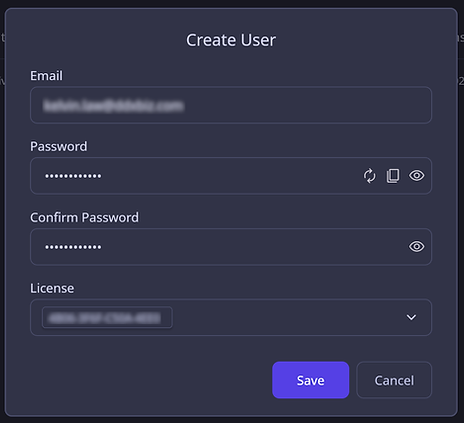
Step 4: Save User
Click Save to create the user.
After Creation
Once the user is created:
-
The user account is ready for use
-
License allocation is applied immediately
Next Step
Proceed to the next guide: Role Access